Google Maps Timeline Mileage Log
Forgot to track your mileage? Google Maps recorded every drive. Turn your Timeline into an IRS mileage log with your Schedule C numbers, in minutes.
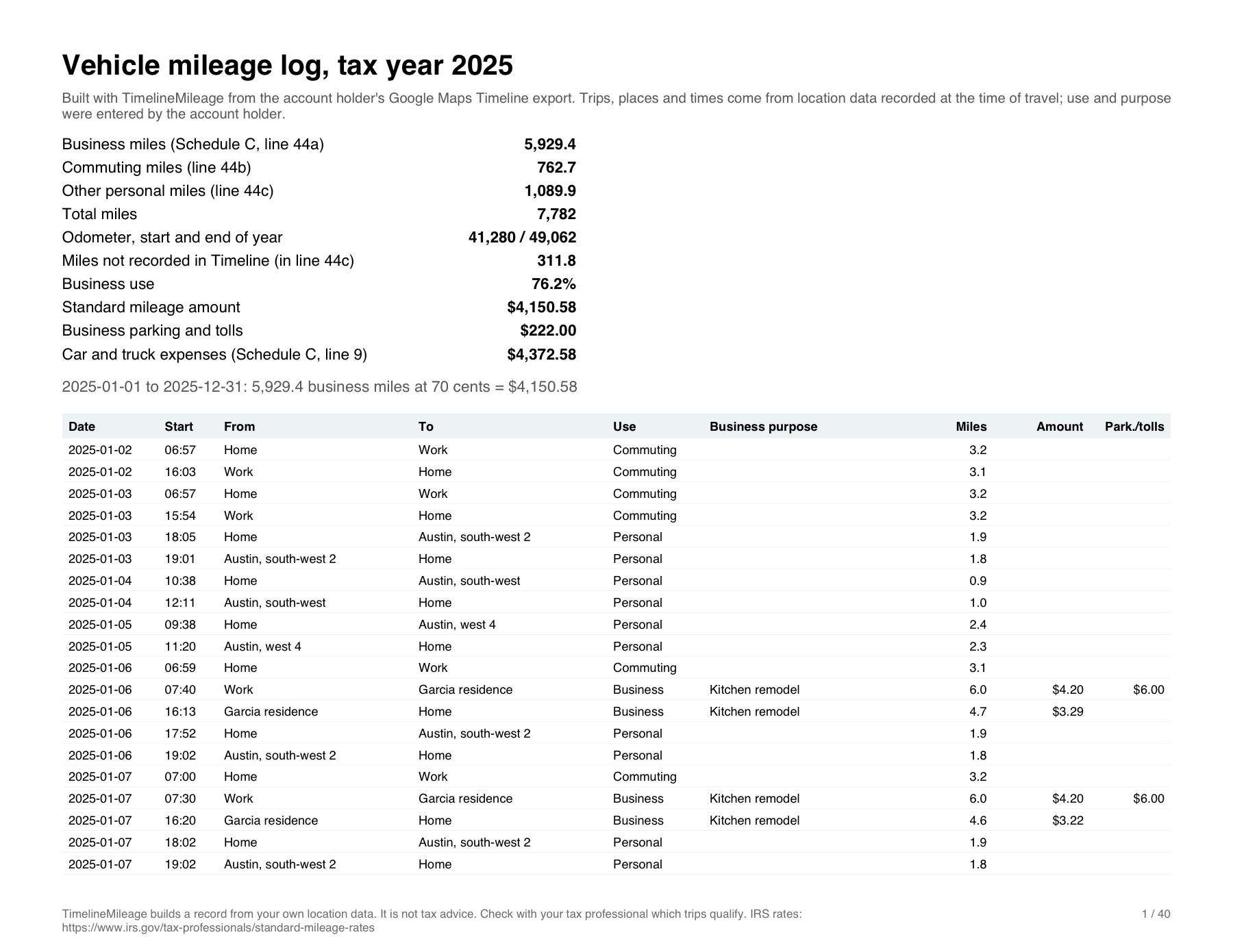
Vehicle mileage log, tax year 2025
Built with TimelineMileage from the account holder's Google Maps Timeline export. Trips, places and times come from location data recorded at the time of travel; use and purpose were entered by the account holder.
- Business miles (Schedule C, line 44a)
- 5,929.4
- Commuting miles (line 44b)
- 762.7
- Other personal miles (line 44c)
- 1,089.9
- Total miles
- 7,782
- Odometer, start and end of year
- 41,280 / 49,062
- Miles not recorded in Timeline (in line 44c)
- 311.8
- Business use
- 76.2%
- Standard mileage amount
- $4,150.58
- Business parking and tolls
- $222.00
- Car and truck expenses (Schedule C, line 9)
- $4,372.58
2025-01-01 to 2025-12-31: 5,929.4 business miles at 70 cents = $4,150.58
From Google Maps Timeline to IRS mileage log
Your Timeline file and a few clicks. Back comes a complete mileage log from Google Maps, for the whole year.
You give
1. Your Timeline file
Timeline.jsonExported from Google Maps on your phone2. Where you drive for work, once per place
- Garcia residenceBusiness
- OfficeCommute
- Whole FoodsPersonal
3. A short purpose for each work place
Client visit, kitchen remodel
Nothing else. No account, no typing trips, nothing uploaded.
You get
- 44a Business
- 5,929.4 mi
- 44b Commuting
- 762.7 mi
- 44c Other
- 1,089.9 mi
- Deduction
- $4,150.58
- PDF log to keepTotals for Schedule C on page one, then every trip of the year
- CSV for your accountantOpens in Excel, Numbers or Google Sheets
An IRS mileage log without the busywork
Nothing uploaded
Your location history is read in your browser. It never reaches us or anyone else.
The right rate
Each drive is valued at the IRS rate of its own day (2026: 72.5¢, then 76¢).
Ready for Schedule C
Business, commuting and other miles, lines 44a to 44c, on page one of your log.
Clear pricing
$49 per tax year, paid once. No subscription, no account.
Made for the self-employed who drive for work
Contractors, 1099 workers, gig drivers: if you file a Schedule C and your phone was in the car, your miles are already recorded.
What the IRS asks you to keep




What are your miles worth?
Estimate your mileage deduction and the tax it saves in 30 seconds, before you open any file.
Example: 150 business miles a week, 48 weeks
Mileage deduction 2026
$5,347
Estimated tax saved
$1,932
Build your mileage log from Google Maps Timeline
Free until you download.
Step 1 of 3
Drop your Timeline export here
It is read in this browser and never uploaded. Large files take a few seconds.
Where is my file?
- Android
- Settings, Location, Timeline, Export. Timeline.json
- iPhone
- Google Maps, Settings, Personal content, Export. location-history.json
- Older history
- A Google Takeout archive. .zip
Pay once, only to keep the files
Check how far back your Timeline goes and see your whole log for free. No subscription, no account.
One tax year
$49
Every trip of the year, PDF, Excel and CSV, Schedule C lines 9 and 44a to 44c.
- IRS rate of each trip date
- Parking, tolls and odometer included
- Refund within 14 days
Every year in your file
$79
For an IRS audit or an amended return (1040-X): every tax year your Timeline holds, unlocked at once.
- All the years, one payment
- Same files for each year
- Refund within 14 days
Buying the current year before it ends? It covers the whole tax year: export your Timeline again in January and download the complete log at no extra cost.
Frequently asked questions
Does the IRS accept a mileage log built from Google Timeline?
The IRS asks for records made at or near the time of each trip, with the date, the destination, the business purpose and the miles. Google Timeline recorded the date, the places and the distance when you drove; you add the purpose. Whether a reconstructed log holds up depends on your situation, so show it to your tax professional.
I forgot to track my mileage last year. Can I still build a log?
If location history was on, yes: Google Maps Timeline recorded each drive with its date, places and distance at the time. You add the business purpose. Records made at the time are what the IRS gives weight to; a log rewritten from memory is not.
What if my Timeline is empty, or only goes back 3 months?
Since Google moved Timeline to the phone, history is often off, or set to delete after 3 months. The tool shows how far back your file goes, month by month, before you pay anything. If part of the year is missing, turn Timeline on and set auto-delete to "Don't auto-delete activity" now, and we can remind you in January to export the complete year.
I drive for Uber, Lyft or DoorDash. Do I mark every address?
No. Turn on working hours: every drive that starts on your working days and hours is business, without marking a single address. Places you do mark keep their own use.
Can I use it for an IRS audit or an amended return?
Yes: the all-years pack unlocks every tax year in your file. The log shows how it was built: trips, times and miles recorded by your phone at the time, use and purpose added by you. Whether the IRS accepts it is up to the examiner; show it to your tax professional.
Is my location history uploaded anywhere?
No. Your file is read by this page, in your browser, on your device. No location, place or date leaves it. Only the payment goes through Stripe, and Stripe never sees your trips.
What does it cost?
$49 for one tax year, paid once. No subscription, no account. You see every trip and every total for free before paying; the payment unlocks the PDF and CSV files of that year.
Which file do I need?
Timeline.json exported from Google Maps on Android, location-history.json from Google Maps on iPhone, or an older Google Takeout ZIP with Location History. The export guide shows each step.
Which mileage rate is used?
The IRS business standard mileage rate of the date of each trip. For 2026 that is 72.5 cents a mile until June 30 and 76 cents from July 1, so a year straddling the change is valued correctly.
What if I am not happy with it?
Write to us within 14 days and you get your money back. You can also try the whole tool on the sample drives first.
Who sells it, how payment works, where your data goes: is TimelineMileage legit? TimelineMileage builds a record from your own location data. It is not tax advice. Check with your tax professional which trips qualify. Rates: IRS standard mileage rates.
Guides for your mileage log
- Before you fileIRS Mileage Log RequirementsWhat the IRS expects in a mileage log: date, destination, business purpose and miles for each trip, plus your total miles for the year. With examples.Read the guide
- Before you fileForgot to Track Mileage for Taxes?Forgot to track your mileage? You can still build an IRS log from records made at the time, like your Google Maps Timeline. What holds up, what does not.Read the guide
- Before you fileHow to Reconstruct a Mileage LogHow to reconstruct a mileage log for past years from records made at the time: Google Maps Timeline, calendars, invoices, odometer. Step by step.Read the guide
- Before you fileMileage Log for an IRS AuditThe IRS asked for your mileage log? What section 274(d) requires, how to rebuild the log from records made at the time, and what to give the examiner.Read the guide
- Rates, templates and alternativesIRS Mileage Rate 2026The 2026 IRS business mileage rate is 72.5 cents a mile to June 30 and 76 cents from July 1. How to apply the split to your own drives.Read the guide
- Get your dataHow to Export Google Maps TimelineExport your Google Maps Timeline from Android or iPhone in under a minute, step by step, and what to do if your history looks empty.Read the guide
- Rates, templates and alternativesMileageWise AlternativeA MileageWise alternative for a mileage log from Google Timeline: one tax year for $49, no subscription, read on your device. An honest comparison.Read the guide
- Rates, templates and alternativesMileIQ AlternativeA MileIQ alternative when you need last year's miles: rebuild the log from Google Maps Timeline for $49 a tax year, no subscription. An honest comparison.Read the guide
- Rates, templates and alternativesFree Mileage Log TemplateFree mileage log template with the columns the IRS expects: date, destination, business purpose, odometer, miles. Excel, CSV and printable PDF.Read the guide
How can we help?
Export help
Android, iPhone or Takeout: the steps to get your Timeline file.
How to export Google Maps Timeline